


rapid! Pay
4.313.77K Reviews
App Specs
- Version
- 1.0.116
- Updated On
- License
- Free
- Downloads
- 1,000,000+
- Developer
- Green Dot
- Categories
- Finance
- Platform
- Android, iOS
Screenshots

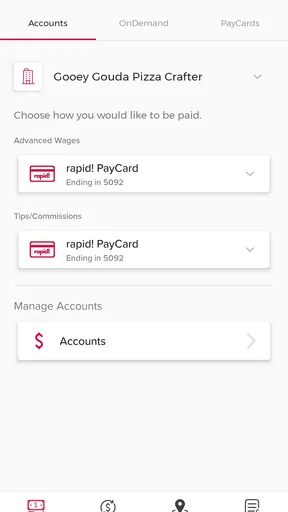

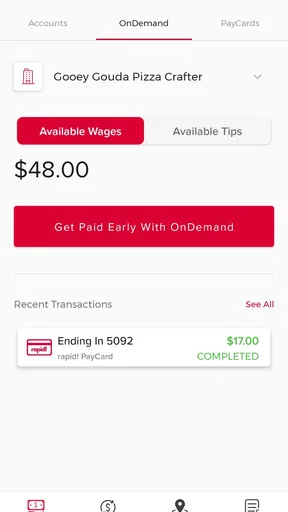
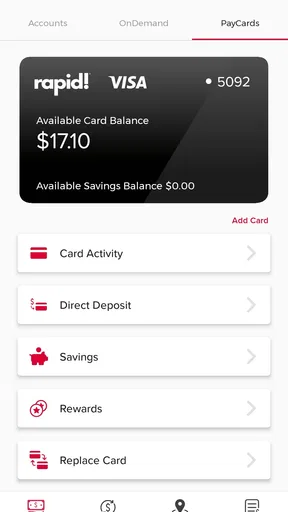
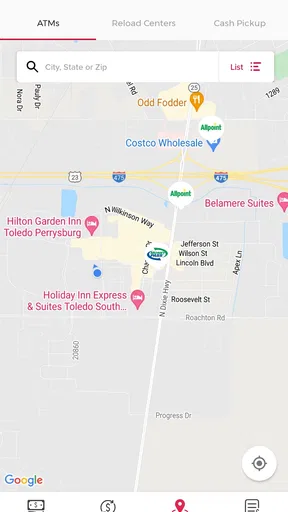
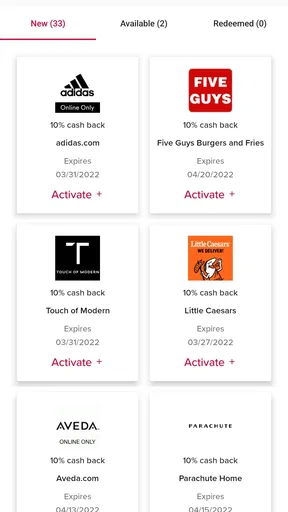
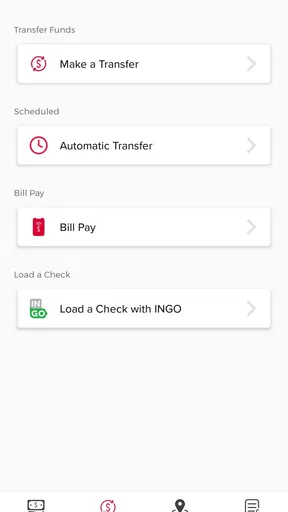
 Analysis by AppCompare
Managing money on a shared household device can be awkward. One person may need to check a balance, another may be waiting for a payment, and a teenager may be asking whether a card is ready to use. rapid! Pay is built for the cardholder rather than for a whole family dashboard, so I found it most useful when one account owner wants a direct mobile view of their rapid! card activity. That distinction matters: it can support household coordination, but it is not a replacement for separate accounts, a shared budget tool, or a parent-controlled finance system.
After spending time with the app, I came away with a fairly clear impression. This is a focused finance app from Green Dot, offered free of charge and rated for Everyone. Its purpose is narrow, which is both its main strength and its biggest limitation. Instead of trying to become a complete banking suite, rapid! Pay gives rapid! cardholders a mobile place to handle the card-related tasks that matter in everyday life.
The app has reached more than a million installs, with an average rating of 4.3 from roughly 78 thousand ratings. Those figures suggest that it has found a practical audience, although popularity alone does not tell me whether it will suit a particular household. The better question is how your home handles money, who needs access, and whether everyone understands the boundary between viewing information and controlling an account.
How rapid! Pay fits into real household routines
I find rapid! Pay most useful when a household treats it as the cardholder’s private checkpoint, not a shared family account. A quick check before an errand can help turn a vague spending assumption into a clear conversation, while keeping sign-in details with the person responsible for the card. That routine also makes it easier to decide what information others actually need before setting up the app.
A useful role on a shared phone or tablet
Imagine a household where one adult uses a rapid! card for regular spending while another person helps keep track of upcoming purchases. The cardholder can open rapid! Pay to review the account, while the other person can ask for an update without needing the physical card in hand. That can make simple coordination easier, especially when the card is used for groceries, commuting, or a recurring household errand.
There is an important practical boundary here. I would not treat a shared phone as proof that everyone should be able to use the app. A finance app is tied to the cardholder’s account, and leaving it signed in on a device used by several people can expose private financial information. rapid! Pay works better when the household agrees on who owns the account and who is merely helping with planning.
For example, if I were using it in a shared home, I would keep the account on the cardholder’s personal phone and discuss totals or available funds when needed. That arrangement avoids turning a family tablet into an informal financial terminal. It also reduces the chance that someone taps the wrong option while borrowing the device for an unrelated task.
Worth Reading Before You Choose

EA SPORTS FC Mobile 26 Is a Bigger Football Game, but It Takes Time

Flipboard Shows What News Apps Must Do Beyond the Feed

Switching to Android Auto Means Rethinking Your Driving Routine

Google Calendar Makes a Crowded Week Easier to Manage

Ludo King Makes the Most of the Minutes Between Plans

Baby Panda World Brings Quick Play to Modern Phones, but Its Game Library Feels Busy
Where the app helps with coordination
The strongest household use case is quick coordination around one card. A cardholder can check the account before agreeing to an errand, confirm whether a planned purchase fits the available balance, and communicate that information to someone else. That is more convenient than repeatedly searching for a physical card or relying on memory.
I also like the idea of using the app as a pause point before spending. In a busy household, people often make assumptions: one person thinks money is available, while another has already used the card. Opening the app before a purchase can prevent that small misunderstanding from becoming a declined transaction or an uncomfortable conversation.
Still, rapid! Pay should not be mistaken for a shared planning workspace. It is not the right tool for combining several people’s income, assigning household categories, or creating a complete family budget. If the main goal is to see rent, utilities, savings, and multiple cards in one place, a dedicated budgeting app or a broader banking service will usually be a better fit.
Why account boundaries matter during setup
Getting started should be approached as an account-owner task. I would install the app on the cardholder’s own device, use the correct rapid! card details, and avoid passing login information around the household. Even when everyone is trusted, shared credentials make it harder to know who changed something or who viewed sensitive information.
This is especially important when a family uses one device for convenience. A child may borrow a parent’s phone, or partners may share a tablet, but that does not automatically make a finance account a shared account. The safer routine is to let the owner sign in personally, check what is needed, and sign out or protect the device before handing it over.
My practical advice is to decide the boundary before installing rapid! Pay: who is the cardholder, who may receive updates, and who should never operate the account. That conversation is more valuable than any shortcut. It prevents the app from becoming an accidental source of confusion in a home where several people handle daily spending.
What to expect from the app’s focused design
The store identifies rapid! Pay as a mobile app for rapid! cardholders, and that focus comes through in the way I think about it. It is not trying to replace every financial service a household might use. The benefit is that a cardholder can go directly to the relevant account instead of navigating through unrelated banking products.
That simplicity can be reassuring for someone who dislikes complicated financial software. A person who only needs a mobile companion for a rapid! card may prefer this focused approach over a large banking application filled with investments, loans, transfers, and other sections they never use.
The trade-off is that users expecting a complete household money center may find the experience limited. I would not choose it as the only financial app for a family that needs shared goals, detailed spending analysis, or several account types under one view. Its value depends on wanting rapid! card access specifically, not on wanting a universal finance organizer.
Age, trust, and responsible access
Because the app carries an Everyone content rating, its presentation is suitable for a broad audience. That rating should not be confused with permission to give every household member access to an adult’s financial account. A child can understand a balance or a spending conversation without being given the ability to open the cardholder’s account on demand.
For families introducing a young person to money management, I would use rapid! Pay as a teaching aid only through the cardholder’s supervision. The adult can explain why a purchase is being checked, how available funds affect a decision, and why account details should remain private. The app can support that conversation, but it does not replace an adult’s judgment about trust and responsibility.
That distinction also applies to older relatives or housemates. Someone may need help checking an account because a phone is unfamiliar, yet assistance does not require permanently sharing access. Sitting together for a specific task is safer than treating the app as a communal utility with no clear owner.
Everyday scenario: planning a household purchase
Here is the situation where I see rapid! Pay earning its place. A household member is heading to the store for several items, but the cardholder is not going along. Before the trip, the cardholder opens the app, checks the account, and tells the shopper whether the planned purchase is sensible. If the list changes, they can discuss the new total rather than relying on an outdated estimate.
The useful insight is not simply that a balance can be viewed. It is that the app creates a deliberate checkpoint between a request and a purchase. In a shared home, that can reduce accidental overspending without requiring everyone to have account access. The cardholder remains responsible for the account, while the other person receives only the information needed for that errand.
I would still avoid sending screenshots through a group chat. Screenshots can remain in photo libraries, backups, and message histories long after the purchase is complete. A spoken update or a short, non-sensitive message is a better household habit when the goal is coordination rather than record keeping.
How it compares with usual finance alternatives
Compared with a general banking app, rapid! Pay may feel more direct for someone whose main concern is a rapid! card. A traditional bank application often brings many services into one place, which is useful when a user already manages checking, savings, transfers, and bills there. That breadth can also make simple card tasks feel less focused.
Compared with a budgeting app, rapid! Pay serves a different purpose. Budgeting tools are generally designed around categories, goals, shared planning, and longer-term patterns. rapid! Pay makes more sense when the immediate need is staying connected to the cardholder’s rapid! account rather than building a detailed financial plan.
Compared with simply checking a physical card or relying on memory, the app offers a more convenient mobile routine. That convenience is valuable, but it can encourage overchecking if a household has not agreed on how information should be shared. The best alternative depends on the job: rapid! Pay for the cardholder’s mobile access, a budget tool for household planning, and a broader bank app for several financial products.
Small habits that make the app more useful
One habit I recommend is checking the account before leaving for an important purchase, not only after a problem occurs. That turns rapid! Pay into a planning tool instead of an emergency tool. It is particularly helpful when several people may have used the card since the last conversation.
A second habit is keeping the app tied to the person who actually owns the rapid! account. This sounds obvious, but household devices blur boundaries quickly. If the app is installed on a shared tablet, anyone who can open it may see information that was never meant for them. Personal-device use keeps responsibility clearer.
A third habit is separating account information from household permission. Knowing that funds are available does not mean every person may decide how they are spent. I would use the app to inform a conversation, not to avoid one. That is a subtle but important difference in shared finances.
Finally, I would treat app updates as part of normal maintenance. The current version is 1.0.116, and the minimum supported operating system is Android 7.0. Keeping the phone’s operating system and the app current is a sensible way to avoid preventable compatibility problems, particularly on an older household device.
What may frustrate the wrong user
The main friction is not that rapid! Pay is too complicated; it is that it may be too narrow. Someone looking for a combined view of several cards or a full family budget could install it and still need another app for the work that matters most. That is not a flaw in a card-focused companion, but it is a mismatch worth recognizing before download.
Shared use can also become inconvenient if several people expect simultaneous access. The app is best understood as belonging to the cardholder, so a household that wants multiple independent logins should look for a service designed around authorized users or joint management. I would not work around that limitation by sharing one password.
Another consideration is trust. A finance app is only as private as the device and sign-in habits around it. A family with weak screen-lock habits, frequently borrowed phones, or unclear account ownership may create more risk through convenience than the app solves. In that situation, improving device boundaries should come before making rapid! Pay part of the household routine.
Who should use it and who should skip it
I would recommend rapid! Pay to a rapid! cardholder who wants a free, straightforward mobile companion for everyday account awareness. It is especially suitable for someone who often needs to coordinate purchases with a partner, housemate, or relative without handing over the physical card.
It can also suit a household that has clear roles: one person owns the account, that person checks the app, and others receive only the information needed to plan a purchase. That arrangement makes the app useful without pretending it is a multi-user family finance system.
I would skip it if your priority is detailed budgeting, shared financial goals, or managing several unrelated accounts from one dashboard. I would also look elsewhere if you need formal delegated access for multiple adults. In those cases, a full-service banking platform or a purpose-built budgeting application is likely to fit better than a focused rapid! card companion.
My household verdict
rapid! Pay is a practical choice when the household question is simple: “Can the rapid! cardholder check the account quickly and coordinate the next purchase?” For that job, its focused nature is an advantage. I prefer it as a personal account tool that supports short, clear conversations rather than as an app everyone in the home opens freely.
The free price removes an obvious barrier, and the broad age rating makes the app approachable in presentation. But the responsible way to use it is still adult and account-specific. Trust should be built through clear boundaries, not through shared passwords or an always-unlocked family device.
My final recommendation is therefore conditional but positive. If you already use a rapid! card and want a mobile way to stay aware of it, rapid! Pay is worth trying. Use it on the cardholder’s device, check it before important errands, and treat household coordination as communication rather than shared account control. If what you really need is a complete family money hub, choose a broader alternative instead; rapid! Pay is at its best when you let it do one focused job well.
Pros
- Fast payments with a simple
- user-friendly interface.
- Supports convenient mobile money transfers and bill payments.
- Transaction history helps users track their spending.
- Payment confirmations provide reassurance after each transaction.
- Useful for managing everyday payments without carrying cash.
Cons
- Availability and features may vary by country or region.
- Some transactions may include service or transfer fees.
- Requires a stable internet connection for most payments.
- Account verification may require personal identification details.
- Support response times can vary during busy periods.
FAQs for rapid! Pay
What is rapid! Pay and what can I use it for?
rapid! Pay is a mobile payment app designed for managing everyday purchases and transactions from a smartphone. Depending on the supported services in your region, users may be able to pay participating merchants, access account or card-related features, review transaction activity, and receive payment updates. Before downloading, check whether the app supports your country, financial institution, and the specific payment methods you plan to use.
Is rapid! Pay safe to use for payments and personal information?
The app is intended to provide a secure way to manage digital payments, but users should still review its privacy policy and security requirements before registering. Protection may include account authentication, device verification, encrypted communication, and additional confirmation for sensitive actions. Never share passwords, verification codes, or payment details, and download rapid! Pay only from an official app store or a verified provider.
Do I need an account, bank card, or participating provider to use rapid! Pay?
Most payment applications require users to create an account and connect an eligible card, bank account, wallet, or employer-supported payment service before completing transactions. rapid! Pay availability can vary according to location and the organization that provides access to it. During setup, users may be asked to verify their identity or phone number, so have the required documents and payment information available.
Are there fees or transaction limits when using rapid! Pay?
The cost of using rapid! Pay depends on the transaction type, the connected payment provider, and the terms applicable in your region. Some features may be free, while certain transfers, withdrawals, card services, or currency conversions could involve charges. Limits may also apply to individual payments or daily activity. Review the fee schedule and account conditions before relying on the app for frequent payments.
What should I do if a payment fails or my phone is lost?
If a payment fails, first check your internet connection, account balance, card status, transaction limits, and whether the merchant accepts rapid! Pay. Avoid repeatedly submitting the same payment until you confirm whether the first attempt was processed. If your phone is lost, contact the relevant support team promptly, secure your account from another device if possible, and ask your bank or provider to block suspicious activity.


